Building a Flip-Dot Display in the Browser, Click Sounds Included
· useless· 9 min read
This is the first of the useless things I said I would build and post: a flip-dot display, built in the browser.
Incheon Airport’s Terminal 1 used to have a Genesis exhibit on the third floor, and its wall was made of flip-dots. d’strict built it in April 2020, and next to it stood a floor-to-ceiling flip-dot wall cycling through the time in cities around the world (invidis). Even on video, the rattle of thousands of discs turning at once is wonderful. So I put it in a browser.
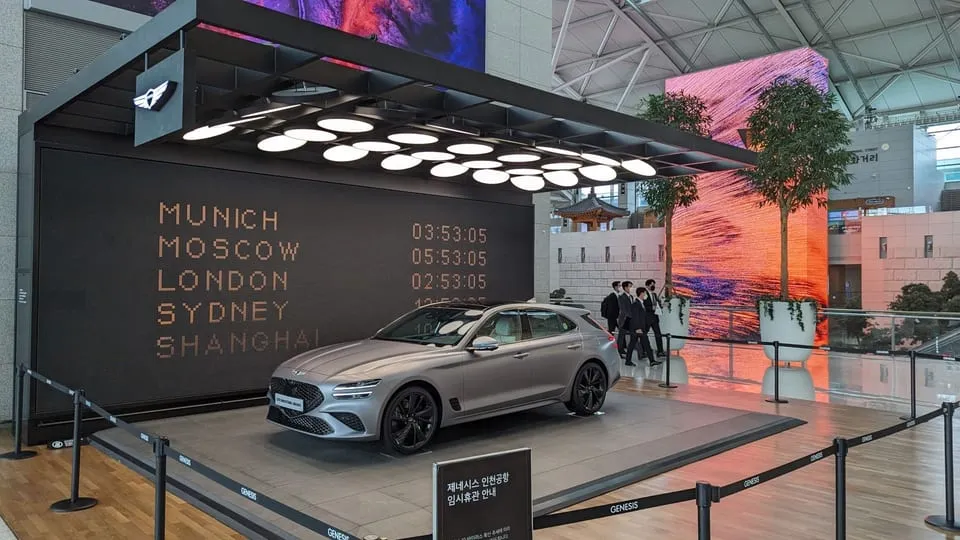
The flip-dot wall of the Genesis exhibit at Incheon Airport Terminal 1, cycling through the time in cities around the world.
Source: invidis
Try it
- It starts in Clock mode, cycling through world cities. The colon blinks every second with a quiet click.
- Press Sound, or any button, once and sound comes on while the whole board flips. The rattle is the whole point, so turn the sound on.
- Text draws uppercase Latin letters and digits in a dot font. Seven characters or fewer get drawn big.
*is a heart. Korean works too, roughly. - IONIQ 5 N is my favorite car. It drives in, stops, blinks its hazards and drives off.
- Draw paints as you drag; press a yellow dot and drag to erase.
- Camera turns your webcam into one bit. Video is processed in your browser and never sent anywhere. Switch between threshold and dithering to see the difference.
How a flip-dot flips
Flip-dots have been around since the 1970s on bus destination signs, station departure boards and highway signs. LEDs have replaced most of them, but the sound and texture keep them alive in installations and exhibition spaces.
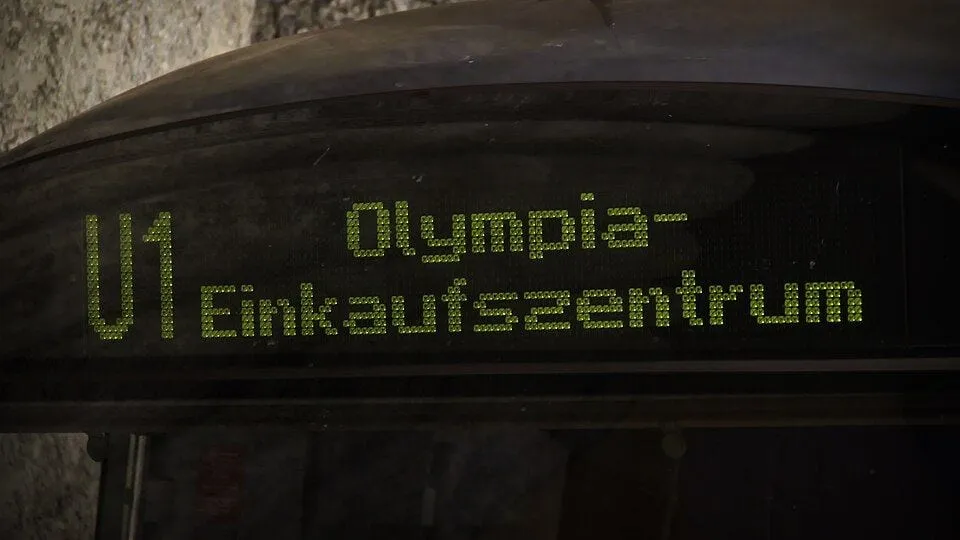
Flip-dot destination sign on a Munich U-Bahn C1 train, still in service.
Source: Wikimedia Commons, Foobian, CC0

The construction is simple. Each dot is a small disc, fluorescent yellow on one side and black on the other, with a permanent magnet embedded in it. The disc sits on an axle so it can turn, and under it is an electromagnet: a core wrapped in a coil. Send a short current pulse through the coil in one direction and the core magnetizes with one polarity. The disc’s magnet swings to match and the yellow face comes forward. Pulse the other way and the black face comes forward.
The core material is the important part. It keeps its magnetism after the current stops, so the disc stays wherever the last pulse put it. The display is bistable: cut the power and the message stays, and energy is spent only at the instant of a flip. The same goes for the sound. The click is the disc hitting its stop as it turns, and thousands of them hitting within a few hundred milliseconds become the rattle.
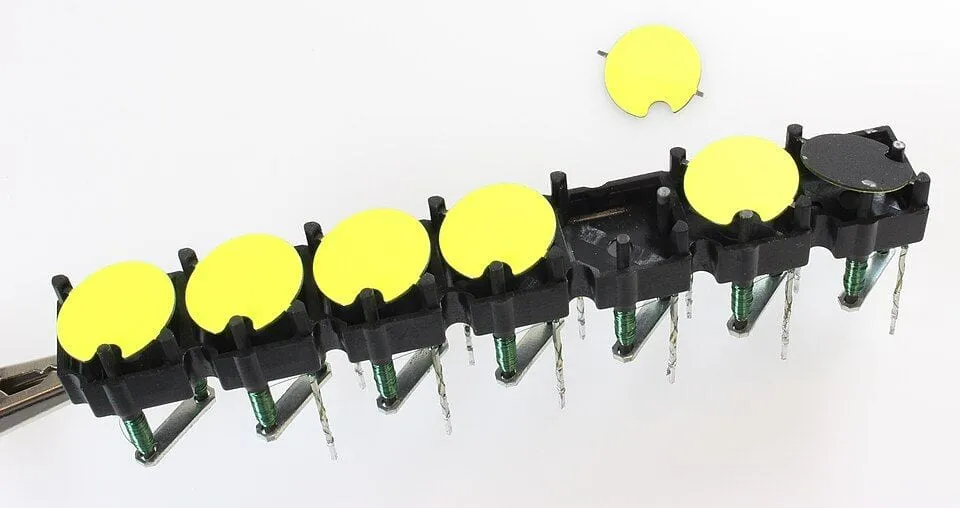
A first-generation Brose flip-dot module. The green windings under each disc are the coils, the one on the right is flipped to black, and the disc set aside above shows the notch where it rides on its axle.
Source: Wikimedia Commons, MakeMagazinDE, CC BY-SA 4.0

The controller doesn’t flip every dot at once. One coil pulse takes somewhere between a few hundred microseconds and a few milliseconds, and the dots share row and column drivers in a matrix, so they get processed one at a time, or at best one row at a time, in order. That’s why a full-screen change sweeps from top to bottom. This constraint is what makes a flip-dot look like a flip-dot, so the simulation copies it faithfully.
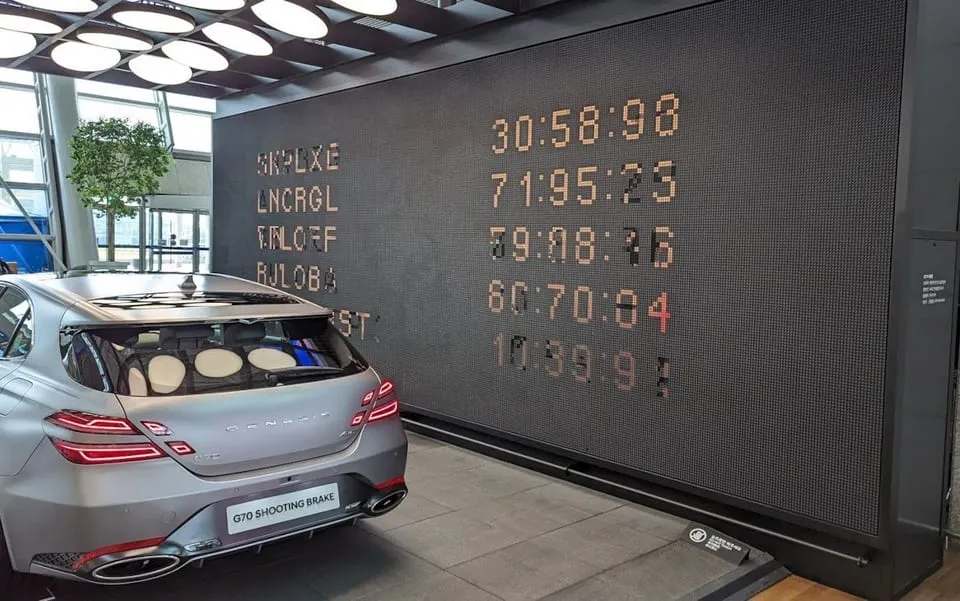
The same wall switching to the next screen. Each line flips at a different moment, so the letters look garbled for an instant. This is the scene I wanted to recreate.
Source: invidis
How it’s built
The board is 84×28, 2,352 dots. Plain TypeScript, no libraries. The code is in the repository.
Drawing 2,352 dots
One DOM element per dot is out. Restyling two thousand elements every frame costs too much layout and paint. A single Canvas 2D with ellipse() handles around ten thousand dots at 60fps, and there was no need to go to WebGL.
For the flip animation, the disc turns top over bottom on a horizontal axle, so its visible height shrinks and grows with the cosine of the angle. At the halfway point, when the disc is exactly edge-on, the color switches. The airport wall flipped the same way.
// p: progress from 0 to 1 over 80ms
const p = (now - flipAt[i]) / FLIP_MS;
let ry = radius;
let on = side[i] === 1;
if (p < 1) {
	ry = Math.max(radius * Math.abs(Math.cos(p * Math.PI)), 0.4);
	if (p < 0.5) on = !on; // the old face shows until halfway
}
ctx.ellipse(cx, cy, radius, ry, 0, 0, TAU);
Dot state lives in three typed arrays: the face currently showing (side), the face the controller wants (target), and the time each dot last started flipping (flipAt). When nothing is moving, nothing is redrawn, which is why the clock mode barely touches the CPU when idle.
Realism comes from constraints
My first version flipped every differing dot the moment target changed. The screen snapped to the new image at once, and it looked oddly fake. Only after adding the hardware’s scan did it look like a flip-dot.
The simulated controller gets a time budget every frame and walks the rows top to bottom. Passing a row costs a base 3ms, plus 0.35ms for every dot it actually flips in that row.
budget += dt; // time elapsed this frame
while (budget > 0) {
	let flipped = 0;
	for (const i of rowCells(scanRow)) {
		if (target[i] !== side[i]) {
			side[i] = target[i];
			flipAt[i] = now + consumed; // later rows start turning later
			flipped++;
		}
	}
	const cost = ROW_MS + DOT_MS * flipped; // 3ms + 0.35ms × flipped dots
	budget -= cost;
	consumed += cost;
	scanRow = (scanRow + 1) % ROWS;
}
With nothing changing, one sweep of the board takes 84ms, about twelve sweeps a second. When the whole board inverts, a sweep takes 0.9 seconds. Busy rows pass slowly, so large changes visibly roll down the board while small ones like the blinking colon land almost immediately.
The click
The sound is synthesized with Web Audio. No sample files, just a slice of noise and some filters. One click is two sounds added together:
- 50ms of white noise through a bandpass filter at a random frequency between 1.8 and 4.2kHz, gone within 22ms. That’s the disc scraping as it turns.
- An 18ms sine wave dropping quickly from 190Hz to 90Hz. That’s the thump of the disc hitting its stop.
The frequency has to vary from click to click. When every click is identical it sounds like a sound effect, and a machine never repeats itself that exactly.
The timing is tied to the scan loop above. When a row flips any dots, a click is scheduled at that row’s consumed time. The more dots flipped, the more clicks that row gets (up to four) and the louder they are. So a full-board change plays rows in sequence as a rattle, and a blinking colon is a single click. Scaling the sound to the number of dots flipping was the single biggest improvement in the whole project.
row(flipped: number, offsetMs: number) {
	const clicks = Math.min(1 + Math.floor(flipped / 10), 4);
	const strength = 0.1 + 0.2 * Math.min(1, flipped / 12);
	const base = ctx.currentTime + 0.012 + offsetMs / 1000;
	for (let i = 0; i < clicks; i++) click(base + i * 0.0015 + Math.random() * 0.002, strength);
}
Browsers block sound until the user has pressed something. So the AudioContext is created on the first click inside the widget, and at that moment the whole board flips yellow and back. It’s the test pattern a real sign runs at power-on, and it tells you the sound is now on.
Five inputs
Clock is just Intl.DateTimeFormat with a timeZone. Twelve cities, three at a time, rotating every six seconds. The letters come from a hand-drawn 5×7 bitmap font: fourteen characters per line, each glyph seven 5-bit numbers.
A: [0b01110, 0b10001, 0b10001, 0b11111, 0b10001, 0b10001, 0b10001],Text uses the same font. It word-wraps up to three lines and doubles the size when a single line fits in seven characters. Korean has no 5×7 bitmap font, so it takes a different route: the text is drawn with the system font onto an 84×28 canvas the size of the board, and the pixels are read back and cut to one bit. Rough, but better than a blank board.
Draw reads pointer events, maps them to a cell and writes straight into target. If the first dot pressed is yellow, the stroke erases. Touch paints thicker than a mouse, and positions are interpolated from the previous sample so fast strokes don’t break up.
Camera took the most work. The getUserMedia stream is drawn, center-cropped and mirrored like a selfie, onto a hidden 84×28 canvas, and getImageData gives the pixels, which are converted to luminance. Then two more steps:
- Stretch the 5th to 95th percentile of brightness out to the full 0 to 255 range (auto levels). Faces show up even in a dim room.
- Blend with the previous frame at 55:45. Raw webcam sensor noise makes every borderline dot flip every frame, so the board never stops twitching. A little temporal smoothing settles it.
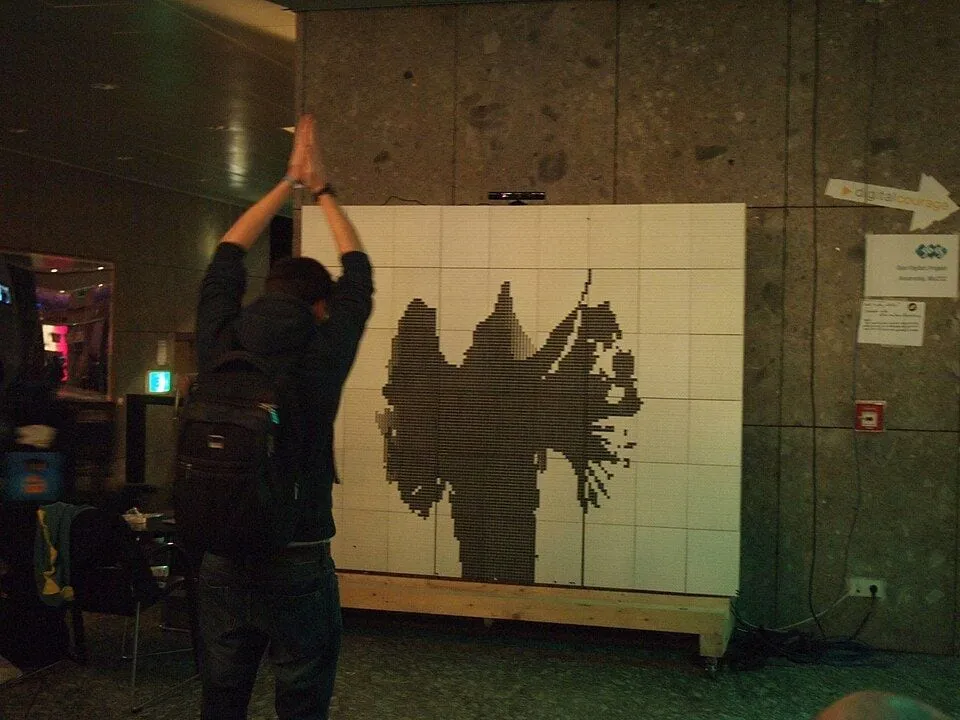
A flip-dot wall at 30C3 in 2013, showing the silhouette of whoever stands in front of its camera. This is what camera mode is after.
Source: Wikimedia Commons, Ordercrazy, CC0

The result still has to become one bit, and there are two ways to do that.
IONIQ 5 N wasn’t in the plan, but a car designed around pixels had to go on a pixel board. I asked Claude for a 58×17 dot side view, with the wheels left out of the art and drawn separately. Rotating the three spokes by distance traveled divided by the wheel radius makes them look like they’re actually rolling. When the car stops in the middle, the pixel lamp cutouts fill with yellow and blink like hazard lights.
Threshold versus dithering
A gray picture has to be drawn with only yellow and black. The easiest way is a threshold: brighter than 128 becomes yellow, anything else black. The result is the left panel below. The gradient collapses into a single edge and the sphere loses its shape.
The right panel is Floyd–Steinberg dithering. The idea is to keep the rounding error instead of throwing it away and push it onto neighboring pixels that haven’t been decided yet. If a pixel with brightness 100 is rounded down to black (0), that’s a debt of 100, and it’s split 7/16 to the right, 3/16 down-left, 5/16 down and 1/16 down-right. Those neighbors get brighter and are more likely to come out yellow, so the proportion of yellow dots in any area ends up matching the original brightness. Blur the dots with your eyes and you see gray.
for (let y = 0; y < rows; y++) {
	for (let x = 0; x < cols; x++) {
		const i = y * cols + x;
		const bit = buf[i] >= 128 ? 1 : 0;
		out[i] = bit;
		const err = buf[i] - (bit ? 255 : 0);
		if (x + 1 < cols) buf[i + 1] += (err * 7) / 16;
		if (y + 1 < rows) {
			if (x > 0) buf[i + cols - 1] += (err * 3) / 16;
			buf[i + cols] += (err * 5) / 16;
			if (x + 1 < cols) buf[i + cols + 1] += (err * 1) / 16;
		}
	}
}
The algorithm dates from 1976 and the code is ten lines. Turn on dithering in camera mode and you get the shading of a face, but far more dots flip, so it’s far louder. It also explains why real flip-dot walls running dithered video are so noisy.
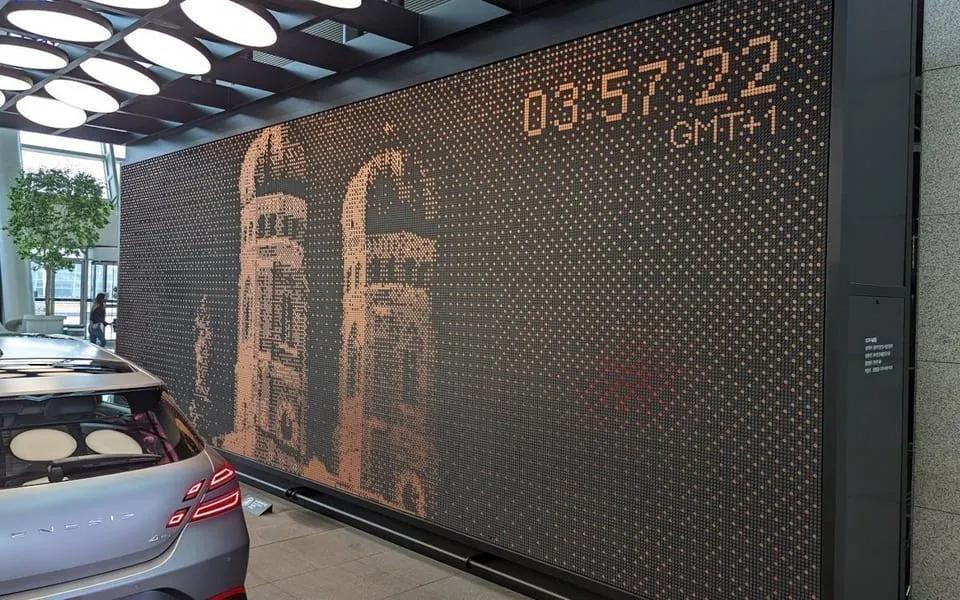
The same wall showing a dithered photo of a city’s landmark.
Source: invidis
Fitting it into the blog
This blog runs on Astro and uses ClientRouter for page transitions, so the script module loads once and doesn’t re-run when you navigate. Setup happens on astro:page-load, and astro:before-swap has to stop the camera and the animation loop. Otherwise the webcam light stays on after you’ve moved to another post.
document.addEventListener('astro:page-load', mountAll);
document.addEventListener('astro:before-swap', unmountAll);
An IntersectionObserver runs requestAnimationFrame only while the board is on screen. A clock clicking away above you while you scroll down to read is surprisingly irritating.
Wrapping up
Two things I learned from this. First, the realism came from the constraints. The board could flip every dot at once, and deliberately refusing to do that was the key. Second, the sound carries half the effect. Once the clicks scaled with the number of flipping dots, it felt like a different object.
The next one will be just as pointless.