A plugin that lets AI look at iPhone Safari directly
· dev· 5 min read
When I hand frontend work to Claude Code, it opens the changed page in Playwright and checks it for me. But some bugs show up in Safari on an iPhone, like 100vh coming out wrong because of the address bar, or the page jumping when the keyboard opens, and you have to look at a real iPhone to see them. So I made a plugin that lets Claude Code see and use Safari on my iPhone.
/plugin marketplace add GUMBOKIM/iphone-webkit-inspector
/plugin install iphone-webkit-inspector@gumbokim
The code is on GitHub.
How it attaches
Android is easy. Chrome on Android speaks CDP (Chrome DevTools Protocol), the same thing Playwright speaks, so you adb forward a port and Playwright attaches as is.
Safari on the iPhone doesn’t speak CDP. It speaks the WebKit Web Inspector protocol, the one the Develop menu in Safari on the Mac uses. Luckily pymobiledevice3 has a webinspector cdp command. It opens a CDP server on the Mac, translates whatever comes in into WebKit commands, and sends them to the iPhone over USB or Wi-Fi. I’ll call it the bridge from here on.
Since the bridge takes CDP, I figured Playwright could attach with connectOverCDP. I tried, and it found no pages at all. I was about to write it off when I realized Safari simply wasn’t in front on the phone at the time. With Safari on screen, it attached. Moving between pages on the same site, reading the DOM and the accessibility tree, typing into inputs, getting console and network events, taking screenshots, all of it worked. For a moment I thought I could just use Playwright.
Then clicks broke. I clicked the posts link at the top of my blog and the page didn’t go anywhere. Looking closer, Playwright’s clicks were arriving only as fake events made inside the page (isTrusted=false). The bridge can only carry what WebKit has, so anything beyond that has nowhere to land. Taps and scrolling don’t work, waiting for a response or intercepting a request hangs, and navigating to another site drops the connection.
I also tried Playwright MCP, which is what Claude Code would actually use. That was worse. If Safari has even one tab in the background, that tab never answers and everything stalls from the first command. Even with a single tab left, the things an AI actually needs, navigation, snapshots and screenshots, all time out. Not something you can hand to an AI.
So I dropped Playwright and built a tool that talks to the bridge directly.
What I built
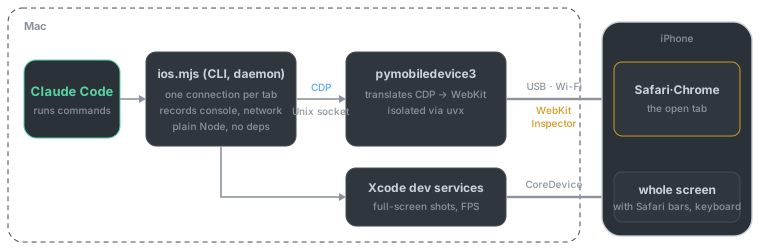
All the commands live in one Node script, ios.mjs, bundled with a SKILL.md that tells Claude when and how to use them, and that’s the Claude Code plugin. No dependencies. The bridge starts through uvx, so you don’t install pymobiledevice3 either. You just need uv.
Attaching to a tab takes several seconds the first time, so a background daemon holds one connection per tab. After that, simple commands finish in about 10ms, and console and network keep getting recorded in between.
The way the AI handles the screen is borrowed from Playwright MCP. snapshot labels buttons and inputs with numbers like @e3, and the AI drives the page with tap @e3 and type. tap isn’t a finger touch; it runs a click inside the page, with WebKit’s emulateUserGesture turned on so things that need a real user action, like playing audio, work too. The posts link Playwright couldn’t follow navigates fine with tap.
The rest is what I’d normally do in DevTools, turned into commands. You can open network responses, find which CSS file a style came from, and set a breakpoint and step through line by line. Whole-screen screenshots that include Safari’s address bar and the keyboard don’t go through the bridge; those come from Xcode’s developer services.
At first the daemon and the bridge listened on 127.0.0.1 ports. When I had other AI tools review the code, they pointed out that a web page, or another user on the same Mac, could reach the iPhone through those ports. Fair enough, so both now use Unix sockets in a folder only my account can open.
What doesn’t work
Only the tab on screen renders. Screenshots and recording cover that tab alone, and it can’t bring another open tab to the front. Safari’s own UI is out of reach too, the address bar buttons, permission prompts, the keyboard. So checking the keyboard still needs a person to tap the input once. Once the keyboard is up, the AI can see the screen.
alert() and confirm() can’t be dismissed by the plugin either. Web Inspector has no command for it. Once one opens, the page stays frozen until someone taps Close. Cross-site navigation still drops the tab connection too, so you reattach.
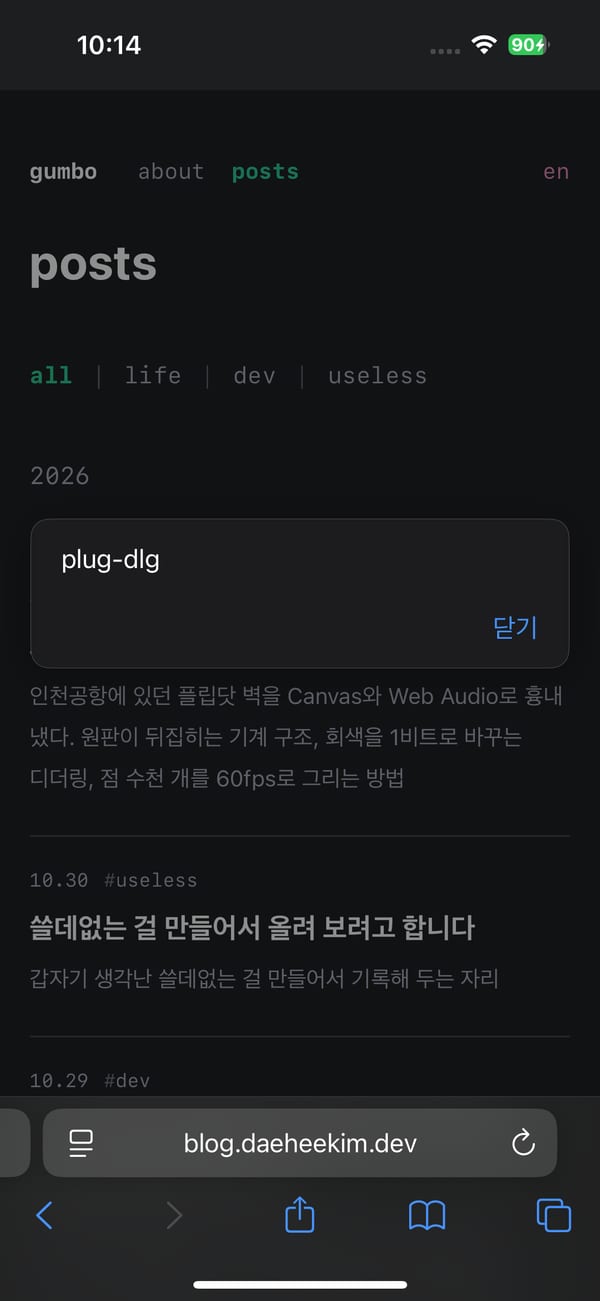
An iPhone screenshot taken by the plugin. A test alert() has frozen the page. It can capture the whole screen down to the address bar, but it can’t press that Close button.
On iOS 18.6.2, LCP and CLS don’t come through. There’s no network throttling either, so I use Settings → Developer → Network Link Conditioner on the iPhone instead.
You need macOS, Xcode, uv, Node 22 or later, and an iPhone on iOS 17 or later with Developer Mode and Safari’s Web Inspector turned on. Ask the AI to run doctor and it will check the setup. Everything here is as of iOS 18.6.2 and pymobiledevice3 11.49.2.