Vibe-Coding a Logitech Plugin: Making the MX Master 4 Buzz on Mac Notifications
· dev· 7 min read
These days I often hand a task to Claude Code and go do something else in another window. The catch is that I never know when it’s done. I switch back to the terminal and it’s still running. I forget about it for a while, switch back, and it finished ages ago.
The MX Master 4 I was using happens to have haptics, so I thought: if the mouse gave a little buzz when a task finished, I’d know without looking at the screen.
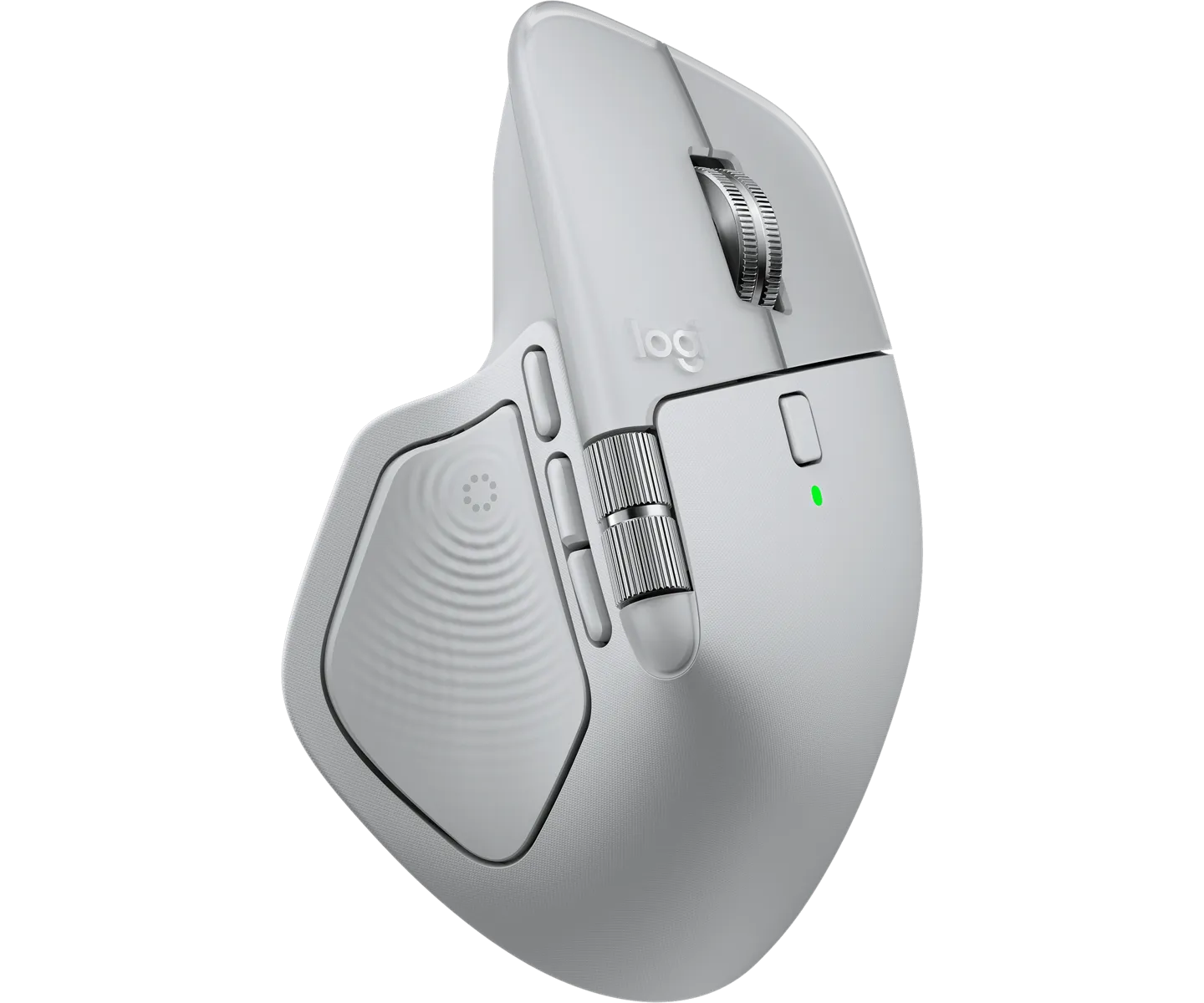
Logitech MX Master 4. The rippled area under the thumb is the Haptic Sense Panel, which vibrates.
Source: Logitech
That’s how MacNotify came about. When a notification banner shows up on the Mac, the mouse vibrates, and you can give each app its own vibration pattern. It’s on the Logitech Marketplace, and the code is on GitHub.
I vibe-coded the whole plugin without writing the code myself. Rather than opening with “build me this,” though, I first checked that it could be done and then handed over a spec. So this post is less about my conversations with the AI and more about deciding what to look into, and judging what came back, before handing the code over.
Before asking for code, I checked it could be done
The first thing I did was find out whether this was possible at all. Broken down, the idea came to three questions.
- How do you make a Logitech mouse vibrate?
- How can you tell, on a Mac, that Claude Code has finished?
- How do you catch the moment a notification appears on a Mac?
If any one of them was a dead end, the feature couldn’t be built at all, so I looked for a way to do each before asking for any code.
Haptics: the Logi Actions SDK
Logitech offers the Logi Actions SDK for building plugins for its Options+ app. Of what I looked at, it was the easiest option. The plugin raises an event, and the mouse plays whatever vibration pattern is mapped to that event.
There are 15 patterns, with names like happy_alert, knock, jingle and firework. Register one event per pattern, and you can switch patterns just by choosing which event to raise.
Just catch the notification
Claude Code can show a Mac notification when it finishes a task. So there’s no need to watch Claude Code itself. Catching the notification is enough.
That’s where I got a bit greedy. KakaoTalk sends notifications, and so does Slack. If I catch every notification, the mouse can buzz for messages too. But if everything buzzes the same way, you can’t tell what came in, so I made it possible to give each app its own pattern: knock for Slack, jingle for Calendar, and so on.
Catching notifications: I tried several ways
The third question was the hardest. macOS has no official API for reading other apps’ notifications. You have to read the traces a notification leaves somewhere, and the question is where. I tried a few things, and two made it to the end.
| Reading the Notification Center database | Reading the notification daemon’s log | |
|---|---|---|
| How | Check the SQLite database Notification Center uses, every second | Stream the log of usernoted, the daemon that shows notifications |
| Delay | About 5 seconds | About 100 ms |
| Permission | Needs Full Disk Access | None |
| Do Not Disturb | Has to be handled separately | Handled for free |
The obvious first idea is the database where notification history is kept. In practice it was slow. Maybe macOS writes records in batches rather than right away, but either way a record only showed up about five seconds after the banner. A buzz after you’ve already read the notification is pointless. Reading that database also needs Full Disk Access, and asking for that just to make a mouse vibrate didn’t feel right.
So I went with the log. If you watch the notification daemon’s log with macOS’s log stream, a line like this appears when a banner is shown:
Presenting <NotificationRecord app:"com.tinyspeck.slackmacgap" ...All you need is to filter for that line:
log stream --style compact --predicate 'subsystem == "com.apple.unc" AND eventMessage CONTAINS "Presenting <NotificationRecord"'When log stream starts, its first line echoes the filter back, and that line contains Presenting <NotificationRecord too. So it has to be skipped. Otherwise the mouse buzzes once the moment the plugin starts, with no notification at all.
It catches the banner within about 100 ms, and detecting it this way needs no special permission. The line includes the sending app’s bundle id (com.tinyspeck.slackmacgap), which is exactly what’s needed to pick a per-app pattern. The plugin never reads the notification’s content. It only uses the fact that a banner appeared and which app sent it.
I also liked that this approach handles Do Not Disturb for free. Presenting is logged only when a banner is actually shown. Notifications silenced by a Focus mode or Do Not Disturb don’t leave that line, so the mouse stays still without any extra code.
I didn’t throw the database approach away, though. If the log stream won’t start, or keeps dying after several restarts, the plugin falls back to checking the database. It shows a warning in Options+ that haptics will lag by about five seconds, and if it can’t read the database because Full Disk Access hasn’t been granted, it shows an error asking for that permission.
How it all fits together
Put together, the whole flow looks like this:
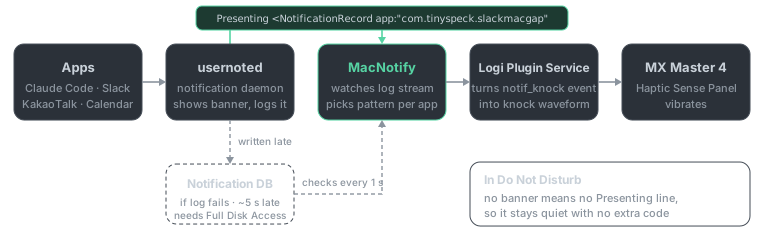
When an app posts a notification, usernoted shows the banner and writes a log line. MacNotify reads the line, works out which app it came from, and raises the event for that app’s pattern, say notif_knock for Slack. Logi Plugin Service then turns that event into the knock waveform and sends it to the mouse.
I handed the research over as a spec
I only asked for the implementation once the research was done. Instead of directing it piece by piece in chat, I wrote everything up in a single requirements spec (a Markdown file) and handed that over.
Everything I’d found went into it: vibrate through SDK events, catch notifications from the usernoted log, fall back to the database if that fails, keep a pattern per app. What to build and how was settled, and only the implementation was left to the AI.
The plugin that came out of it is used through four actions you can bind to mouse buttons in Options+:
| Action | What it does |
|---|---|
| Haptic Pattern | Pick the default vibration pattern, with a live preview as you choose |
| Per-App Haptic Pattern | Give an app its own pattern, or mute it |
| Notification Haptics On/Off | Turn all notification haptics on or off. Handy on a button for meetings |
| Test Haptic | Play the current pattern once |
The per-app list shows apps that have sent notifications before. That list comes from the Notification Center database, so you only see past apps if Full Disk Access is granted. Without it, apps are added one by one as they send notifications after the plugin starts.
You have to hold the mouse to know
Once the code was in, I tested it on the real device. That part I couldn’t hand to the AI. Whether the vibration actually comes through, I checked myself, mouse in hand, firing off notifications.
Marketplace review, and an SDK change
After testing, I submitted v1.0 to the Marketplace in mid-July. While it was in review, Logitech changed things on their side: Logi Plugin Service, which runs the plugins, moved to .NET 10 as of version 6.4.
v1.0 shipped its own copy of the SDK’s PluginApi.dll inside the package. With the service update, that copy was now outdated, and the plugin might not load at all on 6.4 or later. The review also asked me to take the dll out.
So I removed the dll from the package and let the plugin use the one that comes with the service, retargeted to .NET 10, and set the minimum supported version to 6.4. I resubmitted it as v1.0.1 on July 16, and that’s the version on the Marketplace now.
Honestly, the review process was a bit frustrating. Each round trip with Logitech took a long time, and they never told me when the plugin was approved and listed. I only found out it was live by checking the Marketplace myself.
A developer trying vibe coding
Before AI, I would have done all of this by hand: digging through the SDK docs, figuring out where macOS leaves traces of a notification, running examples, and writing the code. That’s where most of the time would have gone.
This time the AI did most of that slow work. Finding and summarizing material and writing the code were its job. My time went somewhere else: deciding which questions needed answering, judging which of the results to go with, and checking that it really worked. Choosing the log over the database, deciding five seconds was too late, not wanting to ask for Full Disk Access just to make a mouse buzz: those were my calls.
For a developer, vibe coding doesn’t so much reduce the work as move where the time goes. The hands-on work shifts to the AI, and you spend more of your time deciding what to look into and judging what’s right.
If you use an MX Master 4, you can get it from the Marketplace. Bug reports and feature requests are welcome on GitHub Issues.